Reports & Analytics
(requires Premium)Overview
The Reports page gives you a longer-term view of your energy patterns. See how your spending changes week over week and how well you stick to your budget allocations.
Note: Reports are a premium feature.
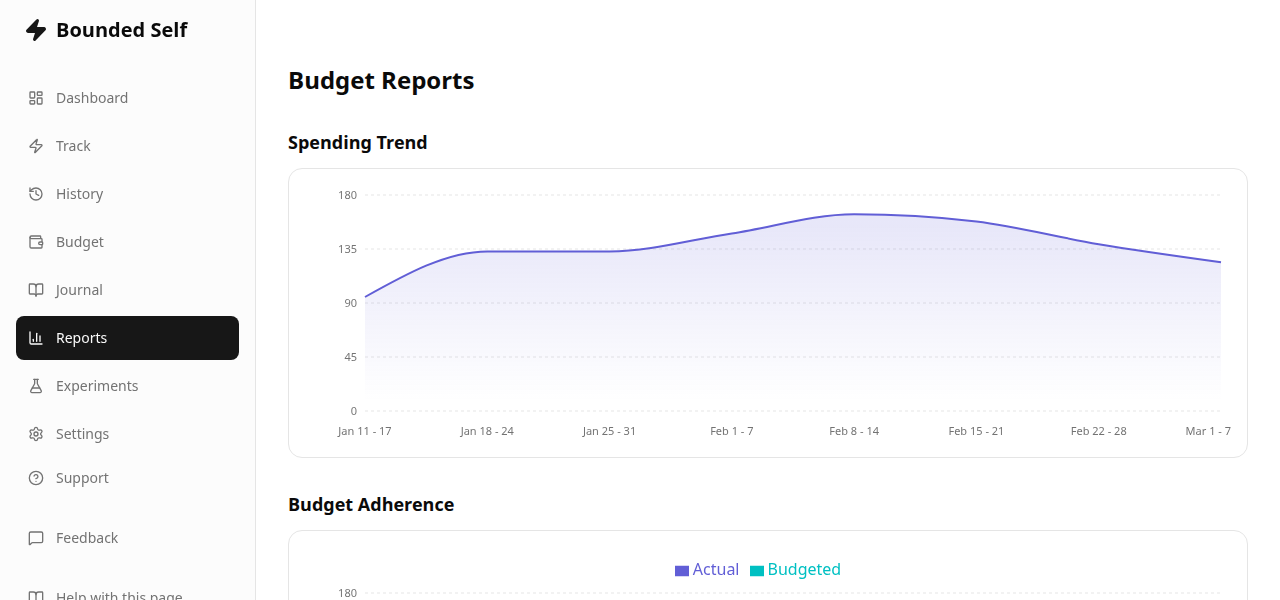
Spending Trend
A chart showing your total energy expenditure across multiple weeks. Use this to spot whether your overall energy spend is increasing, decreasing, or staying stable.
Budget Adherence
See how closely your actual spending matches your budget allocations. This helps you identify categories where your actual spending consistently differs from your allocation. That is a signal to revisit your targets, not necessarily your activity.
Budget Insights
The Budget Insights panel surfaces patterns detected from your allocation and spending data. Insights are grouped into five themes:
- Adherence & Accuracy – how closely your spending matches your budget targets.
- Trends Over Time – whether categories are trending up or down over recent weeks.
- Group-Level – patterns across category groups rather than individual categories.
- Carryover & Capacity – how rollover balances and total capacity are shifting.
- Distribution – how your energy spending is distributed across categories.
Insights appear automatically once you have at least 2 completed weeks of budget data. The more weeks you track, the richer the patterns become.
Missing something?
If there is a report or insight you would like to see here, let us know through our feedback form. We are actively building out the reports page and your input shapes what comes next.
Related
- Energy Budgeting – set up your weekly budget
- Plans & Pricing – reports require premium