Logging an Entry
Logging an energy entry
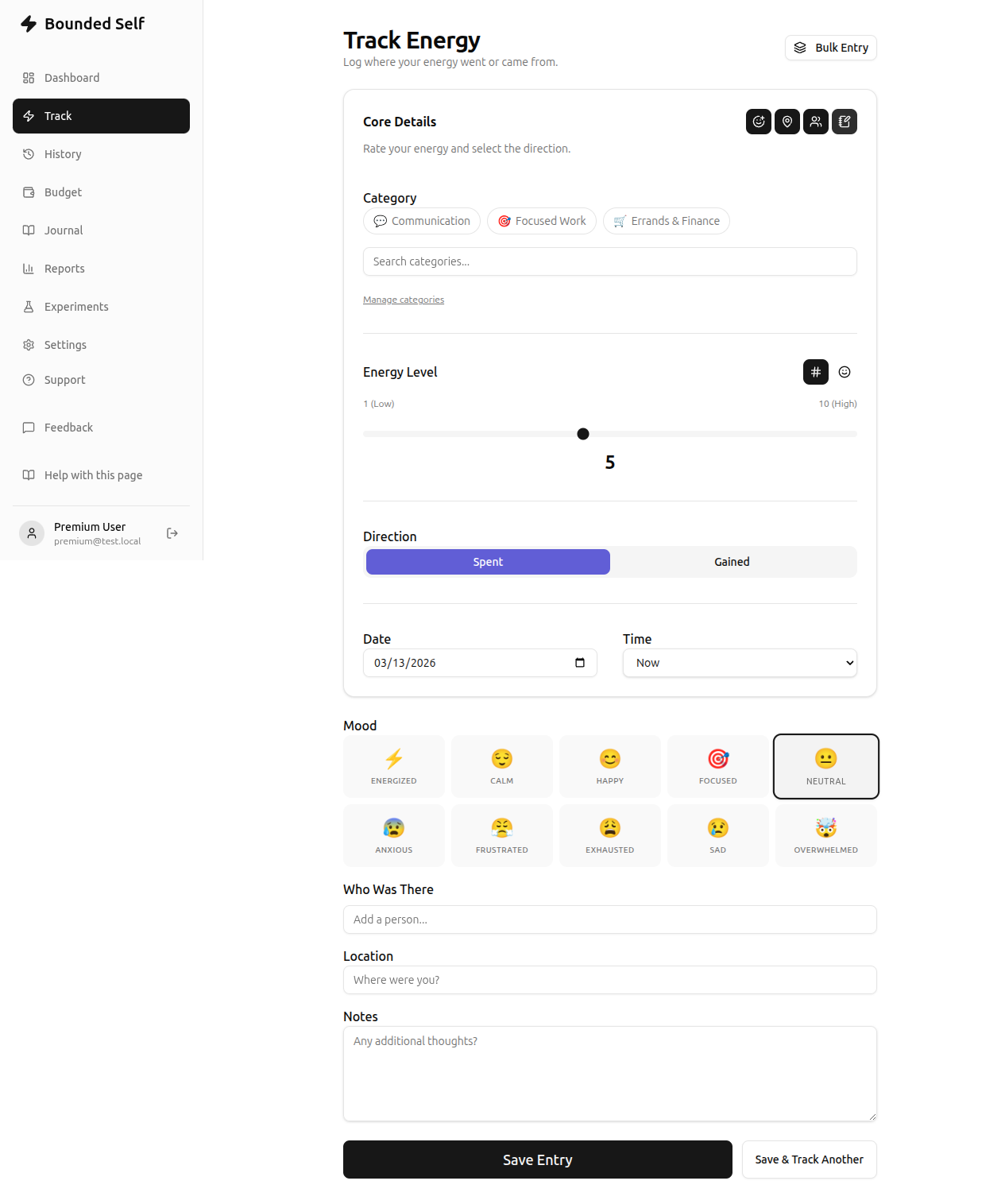
The Track page is where you record how activities affect your energy. Each entry captures an energy level, a direction (gain or expense), and a category. You can also add optional context: mood, self-reported location, people involved, and notes.
Step by step
- Select a category. Choose the category that best describes the activity (e.g. Work, Exercise, Social). This is required.
- Choose an input mode. Toggle between a numeric slider (1–10) or an emoji slider. Your preference is saved for next time.
- Set the energy level. Drag the slider to indicate how much energy the activity gave you or cost you.
- Pick a direction. Select Spent if the activity drained energy, or Gained if it restored you.
- Activate optional context fields. Use the toggle buttons at the top right of the form to enable any combination of:
- Mood – choose from mood options like Energized, Calm, Focused, Anxious, etc.
- Location – record where the activity happened. Manage locations in Managing Locations.
- People – tag people present during the activity. Manage your people list in Managing People.
- Notes – any extra thoughts or context you want to remember.
- Set date and time. The current date and time are pre-filled, but you can backdate entries or assign a time of day (Morning, Afternoon, Evening, Night).
- Save. Tap Save Entry to record the entry, or Save & Track Another to immediately log another.
Tips
- You can log entries at any time – there's no limit to how many you create per day.
- Backdating is useful when you forget to log in the moment.
- Adding notes can help you spot subtle patterns later when you review your history.
- Custom categories can be created in Managing Categories.
Bulk entry
Need to log several activities at once? Bulk Entry lets premium users select a date and time period, then add multiple categories with energy levels in a single session. It's useful for catching up on a day you forgot to track or logging a full morning routine at once.
Common questions
Most tracking questions come from "how do I log X?" — check the Help & FAQ page for quick answers to the most common ones.
Related
- Bulk Entry – log multiple entries at once (premium)
- Getting Started – your dashboard overview
- Viewing History – browse and filter past entries
- Managing Categories – create and organize categories
- Managing Locations – manage location tags
- Managing People – manage people tags